Frontera Technical SupportOften Imitated Never Bettered extra smilies
37 posts
• Page 2 of 2 • 1, 2
Re: extra smilies
I have got a load of them on my photobucket folder but usually, the simplest way is to save the web pages in your favourites, right click on the smilie you want, properties, copy the location addy, then on your FOG post click on the [Img] button and press Ctrl V
 SIZE DOES MATTER!! MEMBER 1728 1996 2.8 SWB called VIPER Members Ride section for VIPER Comments on VIPER here GET YOUR CARTOON CAR HERE
Re: extra smilies
SIZE DOES MATTER!! MEMBER 1728 1996 2.8 SWB called VIPER Members Ride section for VIPER Comments on VIPER here GET YOUR CARTOON CAR HERE
Re: extra smilies
Re: extra smilies
right-click on the smiley you want and select "copy image location"
add the image tag "[img]" then paste the link (or CTRL + V) as you would a normal picture. HTH 
Re: extra smilies
      cheers cheersThe only boundry is your imagination.
Jellybaby (Dave Jellyman)
Re: extra smilies
 Well done Dave Well done DaveSIZE DOES MATTER!! MEMBER 1728 1996 2.8 SWB called VIPER Members Ride section for VIPER Comments on VIPER here GET YOUR CARTOON CAR HERE
Re: extra smilies
 The family that is F.O.G
Long Live,Trusty Rusty 
Re: extra smilies
Gonna give it a whirl [linkurl=]:idunno[/linkurl] [linkurl=]:ohno[/linkurl] [linkurl=]:hehee[/linkurl]
Regards Roo 
Re: extra smilies
hmmmmmm!............ Back into the drawing room!
 Regards Roo
Re: extra smilies
Re: extra smilies
Re: extra smilies
where are u getting the smiley from?
If it is one of Ian's links then when you right click you need to choose "copy image location then use the image tags
Re: extra smilies
Thanks for taking the time DanDan and sorry about this
 Ok what I am doing is writing something out then I go to my bookmark and open the smilies from Ian that I saved in there I click on them and copy and paste it to then img, button up there ^^^^ but when I hit submit and it comes up with just the link and no pictures  Sorry about this http://www.pmdawnonline.com/forum/image ... nfused.gif see if that works Regards Roo
Re: extra smilies
when you have your post a reply box open and want to insert a smilie sellect the smilie you want right click the smilie and sellect properties, there will be an address/url sellect that by placing your curser at the begining and highlighting it then right click and select copy. then go back to your reply box and select the Img button and paste the link in between the brackets
 The only boundry is your imagination.
Jellybaby (Dave Jellyman)
Re: extra smilies
Try this.........
Select the smiley you want and right click then select copy link location like this............... 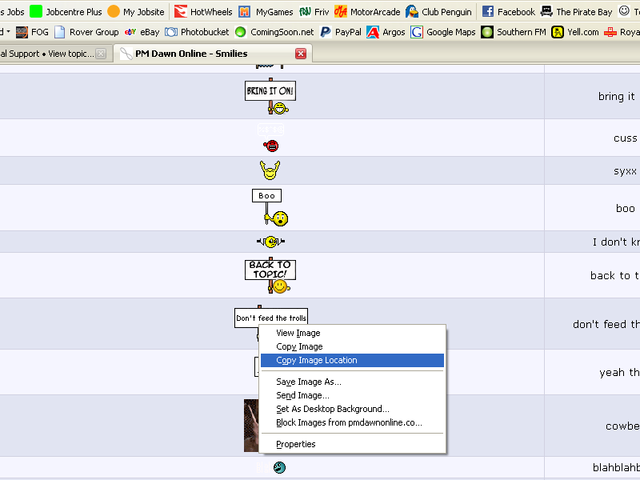 then, in the reply post select the image tags and paste the link in between like this....... 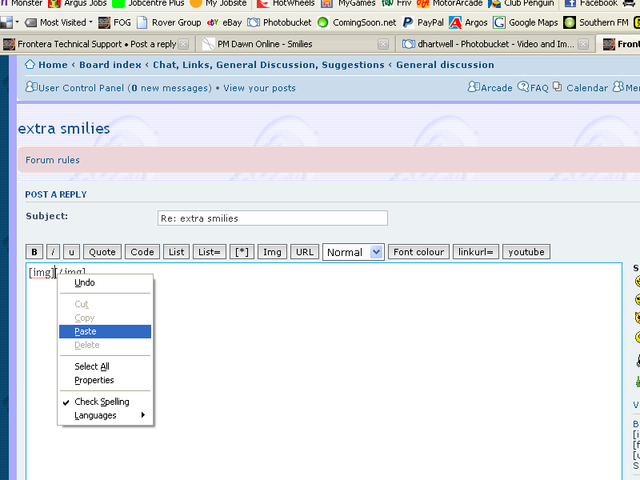 And you should have something like this............. 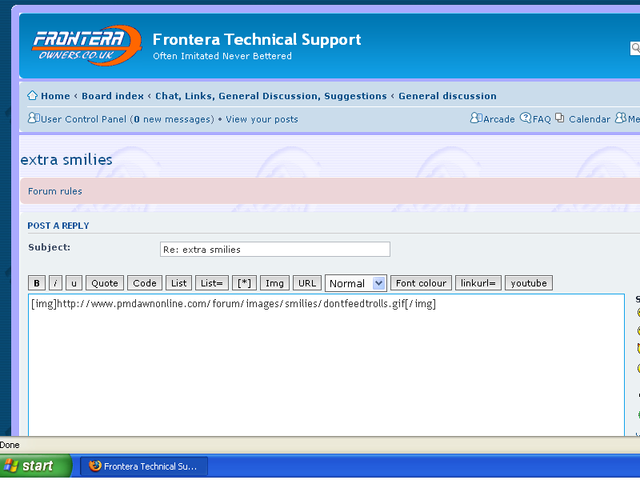 which in turn will give you this............ 
Re: extra smilies
why cant i explain things that clearly
 SIZE DOES MATTER!! MEMBER 1728 1996 2.8 SWB called VIPER Members Ride section for VIPER Comments on VIPER here GET YOUR CARTOON CAR HERE
37 posts
• Page 2 of 2 • 1, 2
Who is onlineUsers browsing this forum: No registered users and 30 guests | ||